Comparing Polars, a Rust DataFrame Crate, with pandas
TL;DR
I discovered that Rust actually has a pandas-like crate, so I put together a comparison of corresponding operations between polars and pandas. No guarantees these are optimal solutions. Also note that there are fairly frequent breaking changes between versions, so be careful about the version you use.
Using this crate, you can potentially process large files much faster, but since it is Rust after all, it does not feel quite as lightweight as Python.
You can run it on Jupyter using excvr. Using Jupyter Lab made it very convenient to compare Python and Rust side by side.
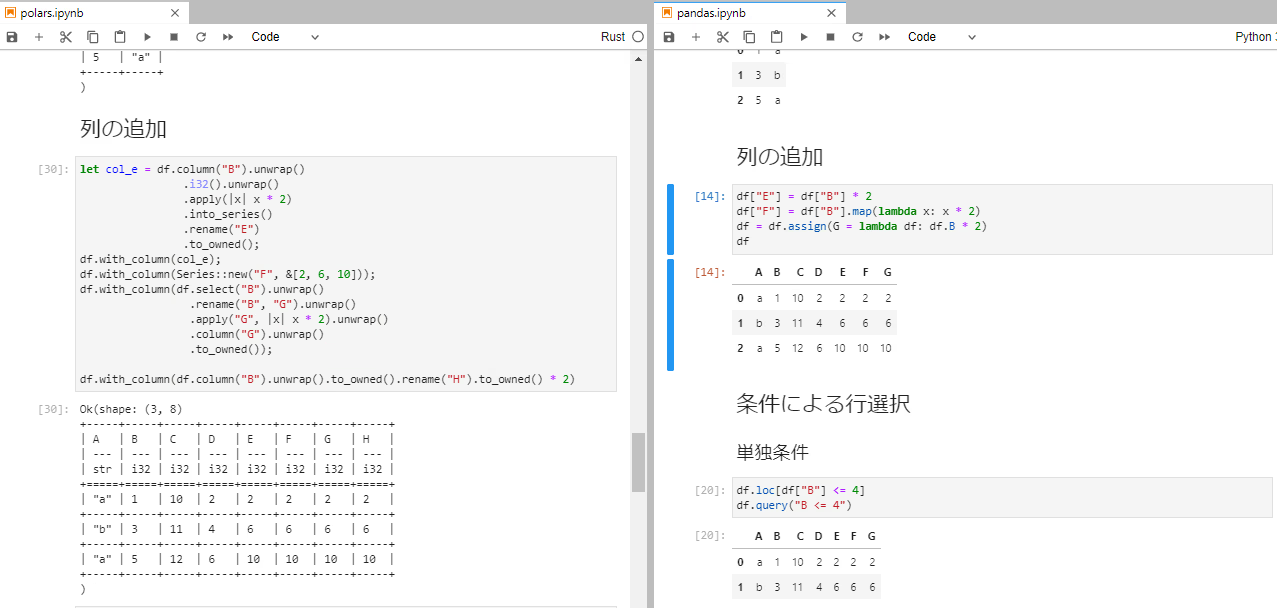
However, I found it a bit inconvenient that there is no code completion or type inference. I also tried setting up rust-analyzer support. Completion started working, but it still felt lacking compared to VSCode.
Here is a sample notebook. You can launch it with docker-compose.
polars
A DataFrame library based on Apache Arrow. There is also something called py-polars, which is supposedly faster than pandas. The polars GitHub repo README includes benchmark tests. In terms of usability, I feel it is more similar to R's tidyverse than to pandas.
ChunkedArray
One distinctive feature is the ChunkedArray struct, which can be converted from a Series. Since ChunkedArray is typed, it supports a variety of operations. Also, when selecting rows based on conditions, you need to use ChunkedArray<BooleanType>.
Install
By choosing features, you can enable date conversion, ndarray conversion, random sampling, and more. This time we will try ndarray and random sampling. We will also add anyhow for error handling.
Cargo.toml
When using Jupyter:
Rust version 1.52 or higher is required.
Install pandas using your preferred package manager.
The Rust side shows code corresponding to the todo!() section below.
The Python side assumes the following import has been done.
Operations on Series, DataFrame, and ChunkedArray
This section is quite long, so it is collapsed. ChunkedArray supports most arithmetic operations. It is worth reviewing the Series comparison section, as it is needed for conditional row selection.
number and Series
| Operation | vs number |
|---|---|
add | s + 1 |
sub | s - 1 |
div | s / 1 |
mul | s * 1 |
Series and Series
| Operation | Syntax |
|---|---|
add | &s1 + &s2 |
sub | &s1 - &s2 |
div | &s1 / &s2 |
mul | &s1 * &s2 |
mod | &s1 % &s2 |
eq | s1.series_equal(s2) |
DataFrame and Series
| Operation | Syntax |
|---|---|
add | &df + &s |
sub | &df - &s |
div | &df / &s |
mul | &df * &s |
mod | &df % &s |
Series operations
| Operation | Syntax |
|---|---|
| sum | s.sum<T>() |
| max | s.max<T>() |
| min | s.min<T>() |
| mean | s.mean<T>() |
Series comparisons
You can compare Series with other Series or with numbers.
| Operation | vs Series | vs number |
|---|---|---|
= | s1.equal(s2) | s1.equal(1) |
!= | s1.not_equal(s2) | s1.not_equal(1) |
> | s1.gt(s2) | s1.gt(1) |
=> | s1.gt_eq(s2) | s1.gt_eq(1) |
< | s1.lt(s2) | s1.lt(1) |
<= | s1.lt_eq(s2) | s1.lt_eq(1) |
DataFrame operations
| Operation | Syntax |
|---|---|
| sum | df.sum() |
| max | df.max() |
| min | df.min() |
| median | df.median() |
| mean | df.mean() |
| var | df.var() |
| std | df.std() |
ChunkedArray operations
ChunkedArray supports most arithmetic operations. The available operators are:
- +
- -
- /
- *
- %
- pow
Additionally, ChunkedArray<BooleanType> supports & and | bitwise operations.
Comparisons work the same way as with Series.
You can also use Iterator- and Vector-style operations such as:
- map
- fold
- is_empty
- contains
- len
among others.
Furthermore, ChunkedArray<Utf8Type> supports to_lowercase, to_upper_case, replace, and similar string methods.
With the default temporal feature, you can also parse dates and times.
Creating a Series
The name is optional.
When using new, the name is required. When using collect, the name defaults to an empty string.
Creating a DataFrame
The macro is convenient.
Column Selection
Using select returns a Result<DataFrame>.
Using column returns a Result<Series>.
Conditional Column Selection
In both cases, you retrieve the columns and apply filtering. I personally prefer the pandas approach using str methods.
In Rust, you can get the columns with get_columns. I wish there were a more elegant way to do this...
Reordering Columns
Adding Columns
In polars, you can add columns using the with_column or replace_or_add functions.
I could not find a convenient function like assign. For basic arithmetic and simple operations, you can convert to Series and compute. I feel like the two to_owned() calls could be eliminated, but I was not able to figure out how.
When you want to use a closure, first convert to a ChunkedArray and then use apply or map. Series is untyped, but ChunkedArray is typed, enabling arithmetic operations.
The DataFrame struct has an apply method, but since it takes &mut self, it modifies the original. So you need to either use select or clone first -- I wonder which one is faster.
Conditional Row Selection
Single Condition
Multiple Conditions
ChunkedArray supports bitwise operations.
Membership Testing
I could only find a way to do this by converting to a ChunkedArray. Since apply returns Self, you cannot convert from ChunkedArray<Int32Type> to ChunkedArray<BooleanType>. Therefore, you need to use map followed by collect.
GroupBy
Prepare a DataFrame for GroupBy operations.
Built-in Operations
polars supports the following built-in aggregation operations:
- count
- first
- last
- sum
- min
- max
- mean
- median
- var
- std
- count
- quantile
- n_unique
The usage pattern is:
- GroupBy on a specific column
- Select the columns to aggregate (all columns if unspecified)
- Apply the aggregation
Single Aggregation
Multiple Aggregations
Custom Aggregations
The return value of apply must be Result<DataFrame>.
hstack, vstack (concat)
These correspond to pandas' concat. Note that these are different from pandas' stack. pandas fills mismatched rows with NaN, whereas polars raises an error.
Prepare the DataFrames.
hstack
vstack
Join
While pandas has a DataFrame join method, I use merge more often, so I will use that here.
In polars, you can use the DataFrame's join method. inner_join, left_join, and outer_join are wrappers around join.
The argument S: Selection accepts &str, &[&str], Vec<&str>, and similar types.
Important Note
One difference between pandas and polars is how columns with identical values are handled. In polars, even if the column names differ, the columns are merged under the left-side column name. In pandas' merge, if the column names are different, the columns are not merged even if the values are identical.
Extracting Duplicate Rows
Removing Duplicate Rows
In both, you can specify a subset to remove duplicates based on specific columns.
Conversion to numpy / ndarray
You need to specify the type.
I/O
CSV can be read with the default features. By enabling additional features, you can also read json, parquet, ipc, and other formats.
read csv
For non-CSV formats, use sep = "\t" or similar.
For non-CSV formats, change the with_delimiter argument as needed. It works without it as well.
Also, if the parallel feature is enabled, it reads using the maximum number of CPU cores, similar to dask. If you do not want this, use something like .with_n_threads(Some(2)). Note that with_n_threads is only available when you create the CsvReader using from_path.
write csv
Same idea as reading.
TODO
- pivot
- melt
- fillna-related operations
- sample_n
- I/O-related operations
I will fill these in over time.
Conclusion
It seems like polars can do a lot. While it does not feel suited for the kind of flexible, ad-hoc processing that pandas excels at, for well-defined processing pipelines, writing them in polars could potentially improve performance significantly.