Using Rust in Jupyter with Evcxr and rust-analyzer
TL;DR
For use cases like quickly trying out Rust, Jupyter is a very useful environment.
By using evcxr, you can use Rust on Jupyter.
Additionally, by using jupyter-lsp to run rust-analyzer on Jupyter, you can improve the development experience.
Bundled with polars, you can see a working example in the following repository:

Creating an Image for evcxr
For installing evcxr_jupyter itself, the official documentation is detailed.
I added libzmq3-dev because I got errors without it.
In addition to installing evcxr_jupyter, we'll also install jupyter-lab, jupyter-lsp, and rust-analyzer.
Dockerfile
Configuration for jupyter-lsp
For major Jupyter languages like python and r, the LSP is detected automatically, but for Rust, you need to write the configuration yourself.
Using the Scala example from jupyter-lsp configuring as a reference, create a configuration file.
Create a jupyter_server_config.d directory under one of the directories shown by jupyter --paths, and place the file there.
In this case, we'll place it at ${HOME}/.jupyter/jupyter_server_config.d/rust-analyzer.json.
rust-analyzer.json
docker-compose Configuration
As mentioned above, place rust-analyzer.json at ${HOME}/.jupyter/jupyter_server_config.d/rust-analyzer.json.
Also, mount the work directory to share it with the local filesystem.
docker-compose.yaml
Creating a Cargo.toml
rust-analyzer itself can work without Cargo in a project (reference), but for simplicity, we'll create a work directory using Cargo.toml to share via docker-compose.yml.
Running
With this, docker-compose up should launch Jupyter.
Completions will work as shown below:
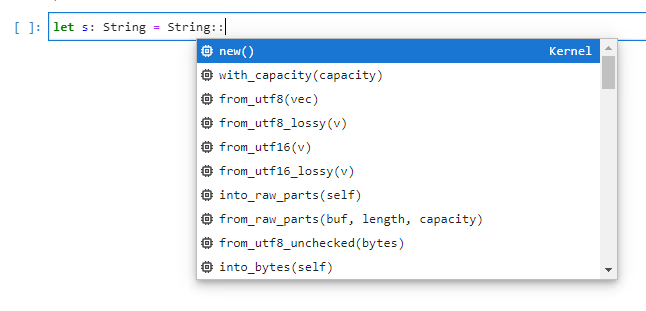
It's not quite as good as VS Code, but it feels more comfortable than tab completion.